
Port Sentinel 2.0
Rebuilding Port Sentinel with Go and Wails for Windows, macOS, and Linux, with careful boundaries around port scanning, elevation, and process termination.
Back in January, I built a small Flutter desktop utility for Windows to put port lookup, process inspection, and termination into a single window. The original release post captured the mild irritation of chasing down PIDs every time a local port collided.
Ten months later, I rewrote it from scratch with Go and Wails v2.
The interface now runs on React, TypeScript, and HeroUI, and the release targets include macOS and Linux desktops alongside Windows. The question at the center of the app has not changed: when a local service refuses to start, who is holding its port, and how do you stop that process cleanly once you are sure?
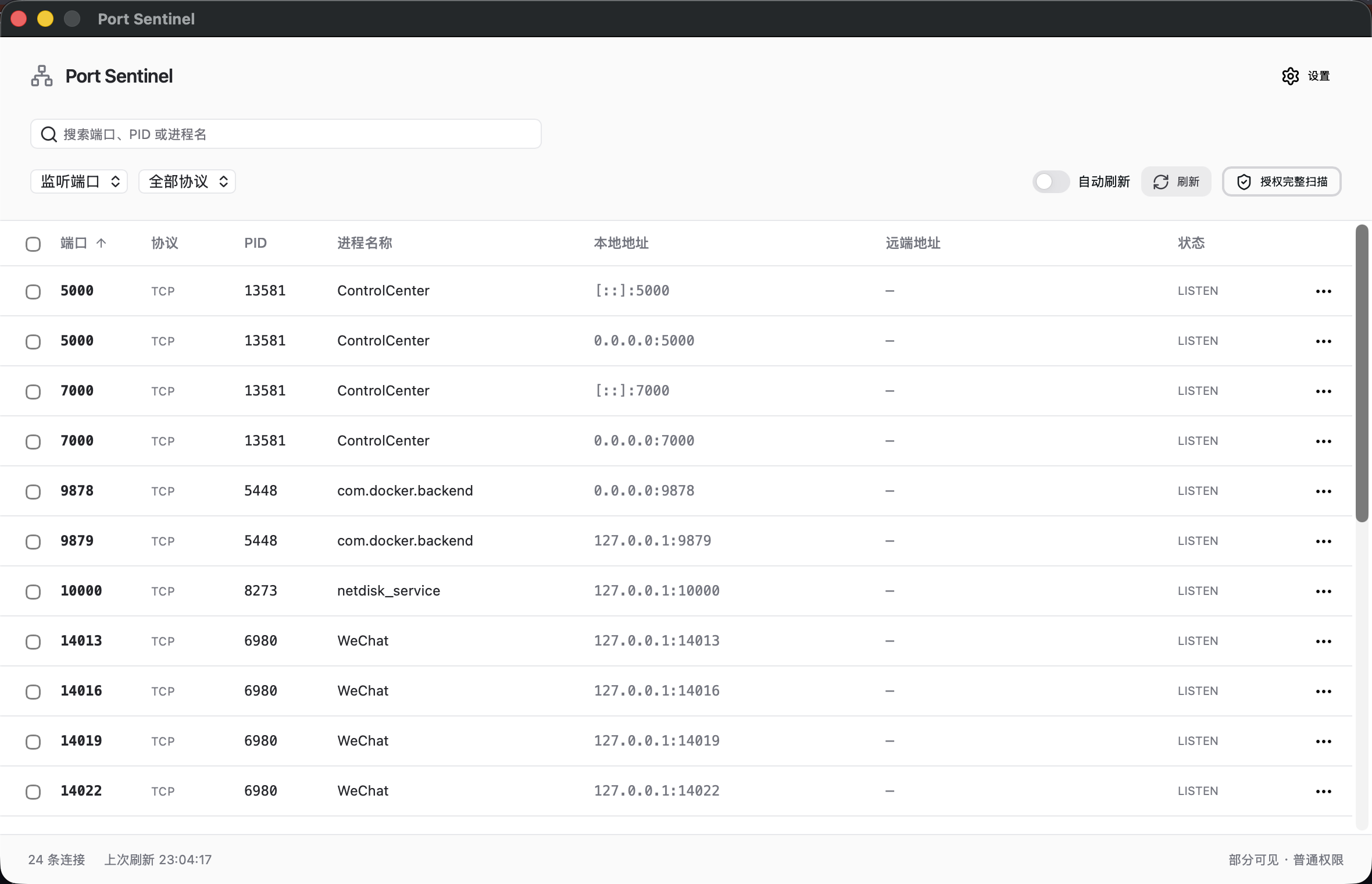
From listening ports to connection details
For everyday port conflicts, the listening-ports view is usually all you need.
When you want to trace local traffic further, you can switch to all connections to inspect local addresses, remote endpoints, and connection states. TCP and UDP across IPv4 and IPv6 sit in the same table, filterable by port number, PID, or process name.
Clicking a process name opens a detail panel showing its executable path and every port tied to it. A single daemon often binds several ports at once; seeing them grouped together makes it obvious whether three mysterious rows belong to the same service.
The app supports Simplified Chinese and English, light and dark themes, and local preferences for refresh intervals and window dimensions. Close the window and the process exits cleanly—ready to be opened again the next time a port is blocked.
Go close to the OS, web for the panel
The rewrite draws a clean line between system work and UI. Go handles socket scanning, process operations, privilege elevation, settings, and updates; React renders the table and dialogs; Wails bridges the two on top of the operating system's native WebView.
Reusing the system WebView keeps the binary light, though it also means respecting older rendering engines. Targeting macOS 12, for instance, means keeping CSS and scripts within the limits of that system's WebKit rather than assuming every machine behaves like the latest browser.
Under the hood, connection scanning has to speak each platform's native dialect.
Windows reads kernel tables via GetExtendedTcpTable and GetExtendedUdpTable. macOS invokes lsof and parses its machine-readable output. Linux reads /proc/net and walks file descriptors to link sockets back to PIDs. All of that platform-specific plumbing lives in the scanning package, handing a uniform structure up to the UI.
Before stopping a process
The table lists individual connections, but termination acts on a whole process.
If a server listens on both 8080 and 8081, killing the process behind 8080 takes 8081 down with it. The confirmation dialog therefore spells out the target process along with all of its bound ports, and batch selection deduplicates by process first—three checked rows may point to a single target.
There is a subtler hazard too: operating systems recycle PIDs.
In the few seconds between a table refresh and a mouse click, the original process might exit on its own while the OS assigns the exact same PID to a brand-new process. To avoid shooting a bystander, Port Sentinel 2.0 records both the PID and the process creation timestamp during a scan, then verifies that identity again right before acting. If the timestamp no longer matches, it aborts. The details live in the process module.
By default, the app asks the target to exit gracefully. If the process stays alive—or if the platform cannot send it a graceful close signal, such as a headless background process on Windows without a message window—the UI reports back clearly and lets you decide whether to force-kill it.
Elevation is equally temporary. The main window runs as a standard user so background refreshes never nag for passwords. Only when you explicitly request an authorized scan, or try to stop a protected process that rejects normal permissions, does the app launch a one-shot helper through Windows UAC, the macOS administrator prompt, or Linux polkit.
Downloads and current boundaries
Prebuilt archives are available on GitHub Releases. Extract the archive to a writable directory before launching; Flutter 1.x users will need to install v2 manually.
| Platform | Package and runtime requirements |
|---|---|
| Windows 10/11 amd64 | ZIP; requires Microsoft Edge WebView2 Runtime |
| macOS 12+ Intel / Apple Silicon | Universal ZIP; keep the complete .app bundle after extraction |
| Ubuntu 22.04/24.04 amd64 desktop | TAR.GZ; requires GTK 3 and WebKitGTK 4.1; elevation requires polkit and a graphical authentication agent |
Current Windows builds are unsigned, and macOS builds use an ad-hoc signature without notarization, so first-launch gatekeeper prompts may appear. Linux package dependencies are documented in the README, and the remaining hardware/desktop validation checklist is tracked openly in the development notes.
Port Sentinel remains open source under the MIT license. Both the source code and release notes are in the repository—if you run into an edge case, feel free to open an Issue.